Custom Commands
Script Commands
Script commands allow you to create more complex commands than text commands. They allow you to write Javascript code to process the command and return a response.
Creating a Script Command
Visit the Web UI, sign in and select your server.
On the page displayed, click the "Add" button on the top right-hand side of the page.
You will be presented with some options for creating commands.
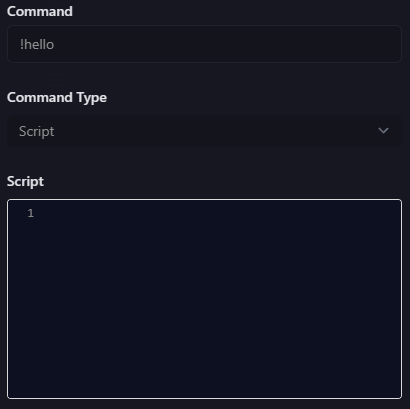
As you can see, this is similar to the text command, only the response box is a simple highlighted Javascript code editor.
Provided variables
A few objects are provided to you with which you can perform some basic tasks and retrieve some information from the command usage.
ctx
The ctx object contains information about the command usage and allows responding to the command.
Here are the available properties:
ctx.sendReply(message)- Sends a reply to the original message that triggered the command. This can only be called once.ctx.getMessageAuthor()- Holds information about the user who used the command, and where it was used.
getMessageAuthor() returns an object containing the following properties:
username: string- Username of the user who triggered the commandping: string- @ ping for the user who triggered the commandavatarUrl: string- URL of the user's avatardiscriminator: string- 4 number discriminator for the username (NOTE: Discord is phasing these out, most users no longer have one)displayName: string- Display name of the user who triggered the command in the current Discord server
kvStore
WARNING
This data is all stored in a sqlite database. It is a single file database and is only backed up once per day.
We take no responsibility for any data loss that may occur. Please ensure you have a backup of your data if you are storing anything important.
The KVStore object allows you to store and retrieve data from the bot's database. This can be used to store data between command usages.
It contains four methods:
kvStore.GetValue(key)
Returns the value stored in the database for the given key as a string.
kvStore.getIntValue(key)
Returns the value stored in the database for the given key as an integer.
kvStore.SetValue(key, value)
Sets a string value within the database
WARNING
Key names are limited to 100 characters. Value names are limited to 1000 characters. Any attempt to set longer values will result in an error.
kvStore.DeleteValue(key)
Deletes a value from the database.
WARNING
You have a maximum limit of 100 stored keys for your guild. Use the kvStore.DeleteValue(key) method to remove keys you no longer need.
kvStore.GetKeys()
Returns an array of all keys stored in the database for the current guild.
Useful for keeping track of what keys you have stored (remembering you only get 100).
random
The random object allows you to generate random numbers. Unfortunately, it is not possible to generate random numbers in Javascript without a seed, so the random object is seeded with the current time when the command is run. Using Javascript's Math.random() function is not recommended as it will always return the same value.
Here are the available methods:
random.Next(min, max)
Returns a random integer between min and max (inclusive).
random.NextDouble()
Returns a random double between 0 and 1 (inclusive).
Example Scripts
Here's a few example scripts to get you started.
Simple response
This script will respond with a simple message when the command is used.
ctx.sendReply("Hello, world!");
Counter
Here is a custom script implementation of the counter argument from Text commands:
function getCounterValue(counterName) {
    return kvStore.GetValue(counterName)
}

function incrementCounter(counterName) {
    let currentValue = parseInt(getCounterValue(counterName))

    if (isNaN(currentValue))
        currentValue = 0

    currentValue++
    kvStore.SetValue(counterName, currentValue.toString())

    return currentValue
}

let counterName = "mycommand";
ctx.sendReply(`Hello, my previous count was ${getCounterValue(counterName)}. My new count is ${incrementCounter(counterName)}`)
Random Number
This script will respond with a random number between 1 and 100.
ctx.sendReply(`Your random number is ${Math.floor(Math.random() * 100) + 1}`);
Appreciate User1
We've got someone in our Discord named User1, and we want to create a custom counter command for them that also implements random numbers to select from a list of responses.
const responses = [
  "User1 has been the best {{times}} times!",
  "User1 has been the coolest {{times}} times.",
  "User1 has been the friendliest {{times}} times"
]

function getCounterValue(counterName) {
  return kvStore.GetIntValue(counterName)
}
function incrementCounter(counterName) {
    let sval = getCounterValue(counterName)
    let currentValue = parseInt(sval)

    if (isNaN(currentValue))
        currentValue = 0

    currentValue++
    kvStore.SetValue(counterName, `${currentValue}`)

    return currentValue
}

let resp = responses[random.Next(0, responses.length)]

resp = resp.replace('{{times}}', incrementCounter('user1Counter'))
ctx.sendReply(resp)